
An expert system emulates the knowledge and expertise of a human being by breaking it up to two parts: A knowledge base, and an inference engine. First developed in the 1960’s and later became widely used in the 1980’s, it is one of the first successful application of AI.
In this series, we will create a program in python that will put you into the seat of an animal expert: allowing us to build a knowledge base of animal traits. Once that is built, the program will use the knowledge base to guess which animal most likely fits with those traits.
Getting Started
If you haven’t already, set up your environment and install python. You can follow the instructions from our previous post on the ELIZA Chatbot.
To begin, we will create a file called Dolittle.py after the famous animal whisperer doctor. Our first job is to define the knowledge base, and it must be persistent. We will use pickle to save and load the knowledge base to a Dolittle_data.dat file.
import tkinter
import pickle
import tkinter as tk
from tkinter import ttk, messagebox, simpledialog, IntVar

datafile = 'Dolittle_data.dat'

class KnowledgeBase:
    def __init__(self):
        self.animals = set()
        self.queries = []

# Load existing knowledge base if available
try:
    with open(datafile, 'rb') as f:
        unpickler = pickle.Unpickler(f)
        knowledgeBase = unpickler.load()
        print("Knowledge base loaded.")
except FileNotFoundError:
    knowledgeBase = KnowledgeBase()
    print("No existing knowledge base found. Starting fresh.")

# To Do: Add something here

# Save knowledge base on exit
with open(datafile, 'wb') as f:
    pickler = pickle.Pickler(f)
    pickler.dump(knowledgeBase)
    print("Knowledge base saved.")
When you first run this code, it would look for the data file and fail to find one. It will then create a new knowledge base object and save it to the datafile. This is output you would see:
No existing knowledge base found. Starting fresh.
Knowledge base saved.

Knowledge base loaded.
Knowledge base saved.
Adding Some GUI
In the place of the To Do comment up above, we will write some GUI code to get started. The placeholder guessAnimal() function will be used later.
def guessAnimal():
    pass

# Create main application window
root = tk.Tk()
frame = ttk.Frame(root, padding="10")
frame.grid()
tk.Label(frame, text="Think of an animal").grid(column=0, row=0)
goButton = tk.Button(frame, text="OK", command=guessAnimal)
goButton.grid(column=1, row=0)

#  Do the main loop
root.mainloop()Code language: PHP (php)
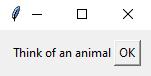
This will just create a prompt window to think of an animal until you close the window.
Asking Questions
In this program, we will simplify the query to a yes or no question. It’s up to the animal expert to determine what they are. Some examples could be: Does it fly? – yes or no, Does it eat meat? – yes or no, Does it have four limbs? – yes or no, etc.
To do this we will create a Query class under the KnowledgeBase class. It will store a question and a list of animals that fit in the yeses category and a set of animals that fit in the nos category. We will also give the Query an ask function that will take a set of possible animals and match it with the yeses and nos.
class Query:
    def __init__(self, question, yeses=set(), nos=set()):
        self.question = question
        self.yeses = yeses
        self.nos = nos

    def __str__(self):
        return'[Q: ' + self.question + ' Y:' + str(self.yeses) + ' N:' + str(self.nos) + ']'

    def ask(self, possible):
        answer = tk.messabox.askquestion(title = "Question", message = self.question)
        if answer == 'yes':
            return possible.intersection(self.yeses), 'yes'
        else:
            return possible.intersection(self.yeses), 'no'
After the Query class we will create a function that checks if the existing questions is sufficient to find the new animal. If it returns False, then we know we need to ask another question.
def canWeFind(newAnimal):
    possible = knowledgeBase.animals
    for query in knowledgeBase.queries:
        if newAnimal in query.yeses:
            possible = possible.intersection(query.yeses)
        if newAnimal in query.nos:
            possible = possible.intersection(query.nos)
    return len(possible) == 1Code language: JavaScript (javascript)
That’s it for now. In the upcoming parts, we will finish off the GUI stuff, and the very important guessAnimal() function.
Leave a Reply