
ELIZA an early chatbot created by Joseph Weizenbaum in 1966. In this series I will attempt to recreate the program in python and learn the fundamental concepts and techniques to make it work. This is solely a learning experience for me to get my feet wet on programming AI.
Like most chatbots, it will only have a minimal understanding of its inputs. An example would be if the user types:
I feel very bored.
The chatbot will not understand what bored means but will reply with something like
How long have you been bored?
Installing Python
First thing’s first, we have to download and install python for windows from:
https://www.python.org/downloads/windows/
Verify the Python version using this prompt in cmd
python -- versionThen check the package manager PIP is installed by typing:
python -m ensurepip --upgrade
Next, use PIP to install the Pygame library for graphics
python -m pip install pygameFinally, the file Eliza.py is created to start the project. I used VS Code with the python extension as my IDE. I would highly recommend using this.
Clean up user inputs
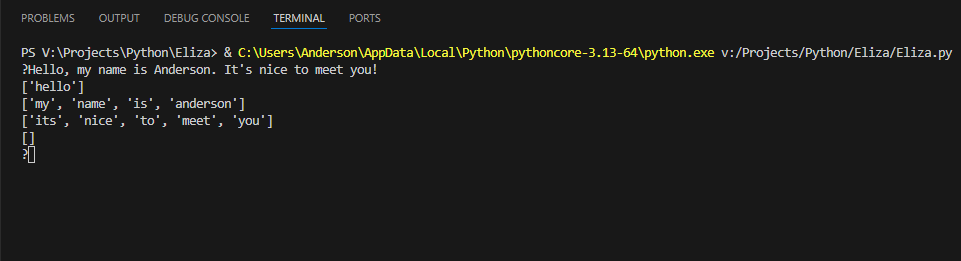
The first step is to clean up the user inputs and partition the text into a list of clauses. We will do that by removing all comma with periods, converting all letters to lowercase, leading spaces will be stripped off and delete all apostrophes.
import random
def splitClauses(text):
    return map(lambda x: x.strip(''),
               text.lower().replace(',', '.').replace('!','.').replace("'", '').split('.'))

def splitWords(text):
    return text.split()

while True:
    text = input('?')
    if len(text) == 0:
        break

    #Do something with the input

    for clause in splitClauses(text):
        print(splitWords(clause))Code language: PHP (php)
When you run this code in the terminal, you get this as a result:
Echoing technique
The next thing we need to do is convert the text so it can be said by the program. For example, every time we see “I” we need to convert it to “you”, and vice versa. In order to do this type of echoing, we need a transform function and a list of conversions:
conversions = {'i': 'you','you': 'i', 'am': 'are', 'are': 'am','my': 'your','your': 'my','myself': 'yourself','yourself': 'myself'}

def transform(text):
    return map(lambda x: conversions[x] if x in conversions else x, text)Code language: JavaScript (javascript)
With this simple conversion, it allows the program to feel like talking to a human without it really knowing any context. In the following parts, we will add a rulebook and pattern recognition. Here’s the full code of what we’ve done:
import random
def splitClauses(text):
    return map(lambda x: x.strip(''),
               text.lower().replace(',', '.').replace('!','.').replace("'", '').split('.'))

def splitWords(text):
    return text.split()

conversions = {'i': 'you','you': 'i', 'am': 'are', 'are': 'am','my': 'your','your': 'my','myself': 'yourself','yourself': 'myself'}

def transform(text):
    return map(lambda x: conversions[x] if x in conversions else x, text)


while True:
    text = input('?')
    if len(text) == 0:
        break

    #Do something with the input

    for clause in splitClauses(text):

        print(list(transform(splitWords(clause))))
Code language: PHP (php)
Leave a Reply to Expert System Part 1 – The Robot FishCancel reply