
In the final part of the series, we will complete the expert system by building the inference engine. This will be done by implementing the guess function that we’ve created earlier. Open the ExpertSystemPart2.html file and let’s begin!
Click here, if you want to see the full demo.
Guess Function
This is the heart of the inference engine. Go to the _guess() function we’ve created earlier in the expert object and replace it with the following:
p._guess = function() { if (this.possibleAnswers.size === 0) { this.giveUp(); } else if (this.possibleAnswers.size === 1) { this.guessAnswer = [...this.possibleAnswers][0]; this.giveAnswer(); } else { this.askBestQuery(); } };
The goal here is to ask queries until we whittle down the set of possible answers down to ether 1 or 0. The intelligence part is how we determine the best query to ask. More on that later.
Giving Up
When we begin interacting with the expert, it knows nothing, so the possible answers are zero. So let’s only consider this scenario for now and we add the dialog box that will handle the give up case.
Copy the following giveUp() function and paste it below the _guess() function .
p.giveUp = function() { this.dynamicForm.create({ title: 'Not found in my knowledge base', fields: [ { type: 'label', text:'Can you please add the answer to my knowledge base?'}, { type: 'textbox', placeholder: '' , name: 'answer'}, { type: 'label', text: 'Optional: Extra context for the answer' }, { type: 'textarea', placeholder: '' , name: 'context'}, { type: 'buttons', options: [ {type: 'yes', text: 'Ok', callback: this._teach.bind(this)}, {type: 'no', text: "I don't know", callback: this._askExpert.bind(this)}, {type: 'no', text: "Try again", callback: this.greet.bind(this)} ]}] });};
When the expert gives up, it will ask the user to “teach” it a new answer. If the user is an expert, it will be an opportunity to add the answer to the database, otherwise we ask the user to find an expert, or we try again and go back to the greeting. Let’s define the _teach() function first. Copy and paste the code below.
p._teach = function() { let newAnswer = this.dynamicForm.textboxes.get('answer').value; let newAnswerContext = this.dynamicForm.textboxes.get('context').value; if (newAnswer === "") { alert("Need to name an answer"); return; } if( this.knowledgeBase.answers.has(newAnswer)) { this.knowledgeBase.deleteAnswer(newAnswer); this._addAnswerToKnowledgeBase(newAnswer, newAnswerContext); return; } this._addAnswerToKnowledgeBase(newAnswer, newAnswerContext);};
Before adding the new answer to the database, the _teach() function makes checks to see if the name field is filled in correctly. If the answer is already in the database, we delete it first so it can have a fresh start.
Copy and add the code below to add answer to the database:
p._addAnswerToKnowledgeBase = function(){ this.knowledgeBase.answers.add(this.newAnswer); this.knowledgeBase.answerContexts.set(this.newAnswer, this.newAnswerContext); if (this.possibleAnswers.size === 0) { this.greet(); return; }; if (this.possibleAnswers.size === 1) { for (const [query, response] of this.askedQueries) { if (response) { query.yeses.add(this.newAnswer); } else { query.nos.add(this.newAnswer); }; } this.notAskedQueries = this.notAskedQueries.union(this.deferQueries); if (this.notAskedQueries.size > 0) { this.fillNotAskedQueries(); } else { this._checkForNewQuery(); } };};
If there are no possible answers, then the knowledge base is new, thus we loop back to the greeting. Otherwise, we have given up after a possible answer was guessed. In that case we fill in the asked queries to the knowledge base. Then we combine the deferred queries to the not asked queries set. We will write the functions to fill not asked queries and checking for a new query later.
Finally let’s add the function to alert the user to find an expert in the event things don’t work out. Add the code below:
p._askExpert = function() { alert('Please ask a ' + this.knowledgeBase.subject + ' expert to fill in the answer');};
Giving an Answer
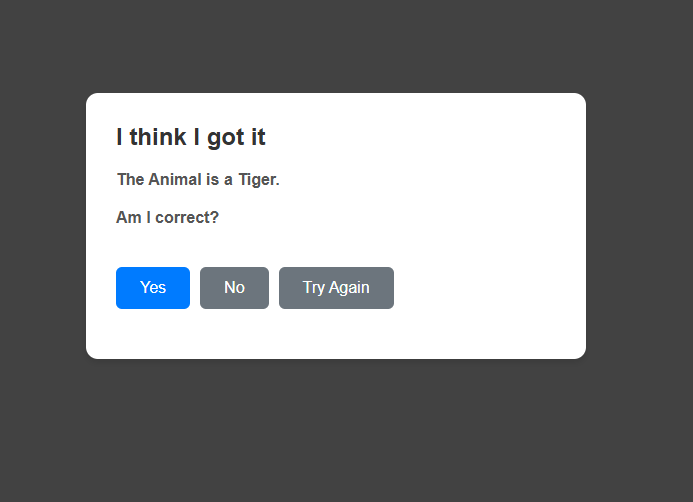
Let’s go back to the _guess() function and consider the next scenario in which there is an existing possible answer from the database. In this case, we simply have to present this answer as a guess to what the user is thinking of.
Copy and add the following code after the _askExpert() function.
p.giveAnswer = function() { const answer = 'The ' + this.knowledgeBase.subject + ' is a ' + this.guessAnswer +'.' const answerContext = this.knowledgeBase.answerContexts.get(this.guessAnswer); this.dynamicForm.create({ title: 'I think I got it', fields: [ { type: 'label', text: answer }, { type: 'label', text: answerContext }, { type: 'label', text: 'Am I correct?' }, { type: 'buttons', options: [ {type: 'yes', text: 'Yes', callback: this.celebrate.bind(this)}, {type: 'no', text: 'No', callback: this.giveUp.bind(this)}, {type: 'no', text: 'Try Again', callback: this.greet.bind(this)} ] } ] });};
In this function we ask the user to confirm if the guess is correct. If the user says yes, we simply celebrate. Otherwise, we either give up or try again.
Let’s handle the celebration case first. Copy and paste the code below.
p.celebrate = function() { this.dynamicForm.create({ title: 'Hooray!', fields: [ { type: 'label', text: 'Thank you for using the expert system' }, { type: 'buttons', options: [ {type: 'yes', text: 'Ok', callback: this.greet.bind(this)}, ] } ] });};
Now we have to handle the case when the user gives up. If we follow the logic in the give up function above, we have to address filling old queries and checking for new queries.
Let’s start with filling not asked queries first. Copy the code below and paste it below the _addAnswerToKnowledgeBase() function.
p.fillNotAskedQueries = function() { const questions = []; for (const query of this.notAskedQueries) { questions.push(query.question); } this.dynamicForm.create({ title: 'Please check each box for each line the answer is yes', fields: [ { type: 'label', text: 'Regarding a ' + this.newAnswer + ":"}, { type: 'checkboxList', options: questions }, { type: 'buttons', options: [ {type: 'yes', text: 'Ok', callback: this._fillNotAskedQueries.bind(this)}, ] } ] }); };p._fillNotAskedQueries = function() { for (const query of this.notAskedQueries) { if (this.dynamicForm.checkboxes.get(query.question).checked) { query.yeses.add(this.newAnswer); } else { query.nos.add(this.newAnswer); }; }; this._checkForNewQuery();};
This dialogue box simply asks the user to fill in the questions not yet asked, and it will add it to the knowledge base.
Asking for a New Query
At the end of the process of giving up, we have to check whether or not there are enough queries to find the answer. If there isn’t enough, we have to ask the user to fill in the missing knowledgebase.
Copy the code and paste it below the _fillNotAskedQueries() function.
p._checkForNewQuery = function() { let possibleAnswers = this.knowledgeBase.answers; for (const query of this.knowledgeBase.queries) { if (query.yeses.has(this.newAnswer)) { possibleAnswers = possibleAnswers.intersection(query.yeses); } if (query.nos.has(this.newAnswer)) { possibleAnswers = possibleAnswers.intersection(query.nos); } }; possibleAnswers.size !== 1 ? this.askNewQuery() : this.greet(); }p.askNewQuery = function() { const question = 'What is a question that will differentiate a ' + this.newAnswer + ' from a ' + this.guessAnswer + '?'; this.dynamicForm.create({ title: 'Need new query', fields: [ { type: 'label', text: question}, { type: 'textbox', placeholder: '' , name: 'question'}, { type: 'label', text: 'Optional: Extra context for the question'}, { type: 'textarea', placeholder: '' , name: 'questionContext'}, { type: 'buttons', options: [ {type: 'yes', text: 'Ok', callback: this._askNewQuery.bind(this)}, ] } ] });};p._askNewQuery = function() { const question = this.dynamicForm.textboxes.get('question').value; const context = this.dynamicForm.textboxes.get('questionContext').value; if (question === '') { alert ('Missing question'); return; } for (const query of this.knowledgeBase.queries) { if (query.question === question){ alert ('Duplicate question'); return; } } this.newQuery = new trf.Query(question, context); this.completeNewQuery();};
In this code above, we first look through the knowledge base queries and see if we can whittle down the possible answers to the new answer. If the possible answers are not equal to 1 then we have to ask a new query.
When we ask for the new query, we simply ask what question would differentiate between the answer we guessed, and the new answer given.
Finaly, we complete the new query by asking the user to fill in how the other answers apply to this new query. Once that is done, we add the new query to the knowledge base.
Copy and paste the code below.
p.completeNewQuery = function() { this.dynamicForm.create({ title: 'Please check each box for each line the answer is yes', fields: [ { type: 'label', text: this.newQuery.question}, { type: 'checkboxList', options: this.knowledgeBase.answers }, { type: 'buttons', options: [ {type: 'yes', text: 'Ok', callback: this._completeNewQuery.bind(this)}, ] } ] });};p._completeNewQuery = function() { for (const answer of this.knowledgeBase.answers) { if (this.dynamicForm.checkboxes.get(answer).checked) { this.newQuery.yeses.add(answer); } else { this.newQuery.nos.add(answer); } }; this.knowledgeBase.queries.add(this.newQuery); this.greet();}
Asking the Best Query
This last part is the heart of the engine. If there are more than 1 possible answer, we need to figure out what is the best question to ask to narrow down our possibilities. The ask best query dialogue box lets the user pick yes, no, and defer query.
Copy and paste the code below the celebrate() function.
p.askBestQuery = function() { this.bestQuery = null; let bestBalance = 9999999; if (this.notAskedQueries.size === 0 && this.deferQueries.size !== 0) { const temp = this.notAskedQueries; this.notAskedQueries = this.deferQueries; this.deferQueries = temp; } for (const query of this.notAskedQueries) { const yeses = query.yeses.intersection(this.possibleAnswers); const nos = query.nos.intersection(this.possibleAnswers); const balance = Math.abs(yeses.size - nos.size); if (balance < bestBalance) { this.bestQuery = query; bestBalance = balance; } }; if (!this.bestQuery) { alert('Out of Queries. Making a guess.'); console.log(this.possibleAnswers); this.possibleAnswers = new Set([[...this.possibleAnswers][0]]); this._guess(); return; } let callbackFunc = this._askBestQuery.bind(this); this.dynamicForm.create({ title: this.bestQuery.question, fields: [ { type: 'label', text: this.bestQuery.context}, { type: 'buttons', options: [ {type: 'yes', text: 'Yes', callback: callbackFunc}, {type: 'no', text: 'No', callback: callbackFunc}, {type: 'no', text: "I don't know", callback: callbackFunc} ] } ] }); this.notAskedQueries.delete(this.bestQuery);};p._askBestQuery = function(event) { const pressed = event.currentTarget.textContent; if (pressed === 'Yes') { this.possibleAnswers = this.possibleAnswers.intersection(this.bestQuery.yeses); this.askedQueries.set(this.bestQuery, true); } else if(pressed === 'No') { this.possibleAnswers = this.possibleAnswers.intersection(this.bestQuery.nos); this.askedQueries.set(this.bestQuery, false); } else { this.deferQueries.add(this.bestQuery); }; this._guess();};
Breaking this code down, we first set the bestQuery to null and the balance to be an arbitrary high number 9999999.
this.bestQuery = null;let bestBalance = 9999999;
Next, we check if the size of the not asked queries is 0. If it is, and the deferred queries are available, we add the deferred queries back to the not asked set.
if (this.notAskedQueries.size === 0 && this.deferQueries.size !== 0) { const temp = this.notAskedQueries; this.notAskedQueries = this.deferQueries; this.deferQueries = temp;}
Then we loop through the queries in the knowledgebase and do some math. The best balance is the one with the smallest difference between the yeses and noes.
for (const query of this.notAskedQueries) { const yeses = query.yeses.intersection(this.possibleAnswers); const nos = query.nos.intersection(this.possibleAnswers); const balance = Math.abs(yeses.size - nos.size); if (balance < bestBalance) { this.bestQuery = query; bestBalance = balance; }};
Finally, we use intersection to group the possible answers based on the yes or no response from the user.
if (pressed === 'Yes') { this.possibleAnswers = this.possibleAnswers.intersection(this.bestQuery.yeses); this.askedQueries.set(this.bestQuery, true);} else if(pressed === 'No') { this.possibleAnswers = this.possibleAnswers.intersection(this.bestQuery.nos); this.askedQueries.set(this.bestQuery, false);} else { this.deferQueries.add(this.bestQuery);};
Expert System
We are now all done! All we have to do is run the program and add knowledge to it. Follow the prompts and see what kind of expert you can develop with this. It can be an animal expert, car expert, or even a troubleshooting expert. The intelligence lies in asking the right questions! Click here for the files in part 3!
Leave a Reply